1 背景介绍
使用深度学习开源框架Pytorch训练完网络模型后,在部署之前通常需要进行格式转换,例如地平线工具链模型转换目前仅支持Caffe1.0和ONNX(opset_version=10/11 且 ir_version≤7)两种。ONNX(Open Neural Network Exchange)格式是一种常用的开源神经网络格式,被较多推理引擎支持,例如Pytorch、PaddlePaddle、TensorFlow等。本文将详细介绍如何将Pytorch格式的模型导出到ONNX格式的模型。
2 实验环境
本文以Python3.6为例,涉及到的whl包及版本信息如下:
torch 1.10.2
onnx 1.8.0
onnxruntime 1.10.0
numpy 1.19.5
3 torch.onnx.export函数简介
torch.onnx.export函数实现了Pytorch模型导出到ONNX模型,在pytorch1.10.2中,torch.onnx.export函数参数如下:
大多数参数使用默认配置即可,下面对常用的几个参数进行介绍:
其它参数的介绍可参考官方torch.onnx.export()函数手册。
4 单输入网络导出ONNX模型代码实操
该节内容主要包括单输入网络构建、模型导出生成ONNX格式、导出的ONNX模型有效性验证三个部分。可直接运行下方代码得到对应的ONNX模型,欢迎参考代码中的注释进行理解。
# -----------------------------------#
# 定义一个简单的单输入网络
# -----------------------------------#
class MyNet(nn.Module):
def __init__(self, num_classes=10):
super(MyNet, self).init()
self.features = nn.Sequential(
nn.Conv2d(3, 32, kernel_size=3, stride=1, padding=1), # input[3, 28, 28] output[32, 28, 28]
nn.BatchNorm2d(32),
nn.ReLU(inplace=True),
nn.Conv2d(32, 64, kernel_size=3, stride=2, padding=1), # output[64, 14, 14]
nn.BatchNorm2d(64),
nn.ReLU(inplace=True),
nn.MaxPool2d(kernel_size=2) # output[64, 7, 7]
)
# 定义一个简单的单输入网络
# -----------------------------------#
class MyNet(nn.Module):
def __init__(self, num_classes=10):
super(MyNet, self).init()
self.features = nn.Sequential(
nn.Conv2d(3, 32, kernel_size=3, stride=1, padding=1), # input[3, 28, 28] output[32, 28, 28]
nn.BatchNorm2d(32),
nn.ReLU(inplace=True),
nn.Conv2d(32, 64, kernel_size=3, stride=2, padding=1), # output[64, 14, 14]
nn.BatchNorm2d(64),
nn.ReLU(inplace=True),
nn.MaxPool2d(kernel_size=2) # output[64, 7, 7]
)
# -----------------------------------#
# 导出ONNX模型函数
# -----------------------------------#
def model_convert_onnx(model, input_shape, output_path):
dummy_input = torch.randn(1, 3, input_shape[0], input_shape[1])
input_names = ["input1"] # 导出的ONNX模型输入节点名称
output_names = ["output1"] # 导出的ONNX模型输出节点名称
# 导出ONNX模型函数
# -----------------------------------#
def model_convert_onnx(model, input_shape, output_path):
dummy_input = torch.randn(1, 3, input_shape[0], input_shape[1])
input_names = ["input1"] # 导出的ONNX模型输入节点名称
output_names = ["output1"] # 导出的ONNX模型输出节点名称
if name == '__main__':
model = MyNet()
# print(model)
# 建议将模型转成 eval 模式
model.eval()
# 网络模型的输入尺寸
input_shape = (28, 28)
# ONNX模型输出路径
output_path = './MyNet.onnx'
model = MyNet()
# print(model)
# 建议将模型转成 eval 模式
model.eval()
# 网络模型的输入尺寸
input_shape = (28, 28)
# ONNX模型输出路径
output_path = './MyNet.onnx'
5 多输入网络导出ONNX模型代码实操
该节内容主要包括多输入网络构建、模型导出生成ONNX格式、导出的ONNX模型有效性验证三个部分。可直接运行下方代码得到对应的ONNX模型,欢迎参考代码中的注释进行理解。
# -----------------------------------#
# 定义一个简单的双输入网络
# -----------------------------------#
class MyNet_multi_input(nn.Module):
def __init__(self, num_classes=10):
super(MyNet_multi_input, self).init()
self.conv1 = nn.Conv2d(3, 32, kernel_size=3, stride=2, padding=1) # input[3, 28, 28] output[32, 14, 14]
self.bn1 = nn.BatchNorm2d(32)
self.relu1 = nn.ReLU(inplace=True)
# 定义一个简单的双输入网络
# -----------------------------------#
class MyNet_multi_input(nn.Module):
def __init__(self, num_classes=10):
super(MyNet_multi_input, self).init()
self.conv1 = nn.Conv2d(3, 32, kernel_size=3, stride=2, padding=1) # input[3, 28, 28] output[32, 14, 14]
self.bn1 = nn.BatchNorm2d(32)
self.relu1 = nn.ReLU(inplace=True)
# -----------------------------------#
# 导出ONNX模型函数
# -----------------------------------#
def multi_input_model_convert_onnx(model, input_shape, output_path):
dummy_input1 = torch.randn(1, 3, input_shape[0], input_shape[1])
dummy_input2 = torch.randn(1, 1, input_shape[0], input_shape[1])
input_names = ["input1", "input2"] # 导出的ONNX模型输入节点名称
output_names = ["output1"] # 导出的ONNX模型输出节点名称
# 导出ONNX模型函数
# -----------------------------------#
def multi_input_model_convert_onnx(model, input_shape, output_path):
dummy_input1 = torch.randn(1, 3, input_shape[0], input_shape[1])
dummy_input2 = torch.randn(1, 1, input_shape[0], input_shape[1])
input_names = ["input1", "input2"] # 导出的ONNX模型输入节点名称
output_names = ["output1"] # 导出的ONNX模型输出节点名称
if name == '__main__':
multi_input_model = MyNet_multi_input()
# print(multi_input_model)
# 建议将模型转成 eval 模式
multi_input_model.eval()
# 网络模型的输入尺寸
input_shape = (28, 28)
# ONNX模型输出路径
multi_input_model_output_path = './multi_input_model.onnx'
multi_input_model = MyNet_multi_input()
# print(multi_input_model)
# 建议将模型转成 eval 模式
multi_input_model.eval()
# 网络模型的输入尺寸
input_shape = (28, 28)
# ONNX模型输出路径
multi_input_model_output_path = './multi_input_model.onnx'
更多内容可参考 PyTorch官方导出ONNX模型教程。
6 ONNX模型可视化
导出成ONNX模型后,可以使用开源可视化工具Netron来查看网络结构及相关配置信息。Netron的使用方式主要分为两种,一种是使用在线网页版,另一种是下载安装程序。下面以在线网页版打开第4节中导出单输入ONNX模型为例,进行介绍。点击在线网页版链接,打开导出的ONNX模型,可视化效果为:
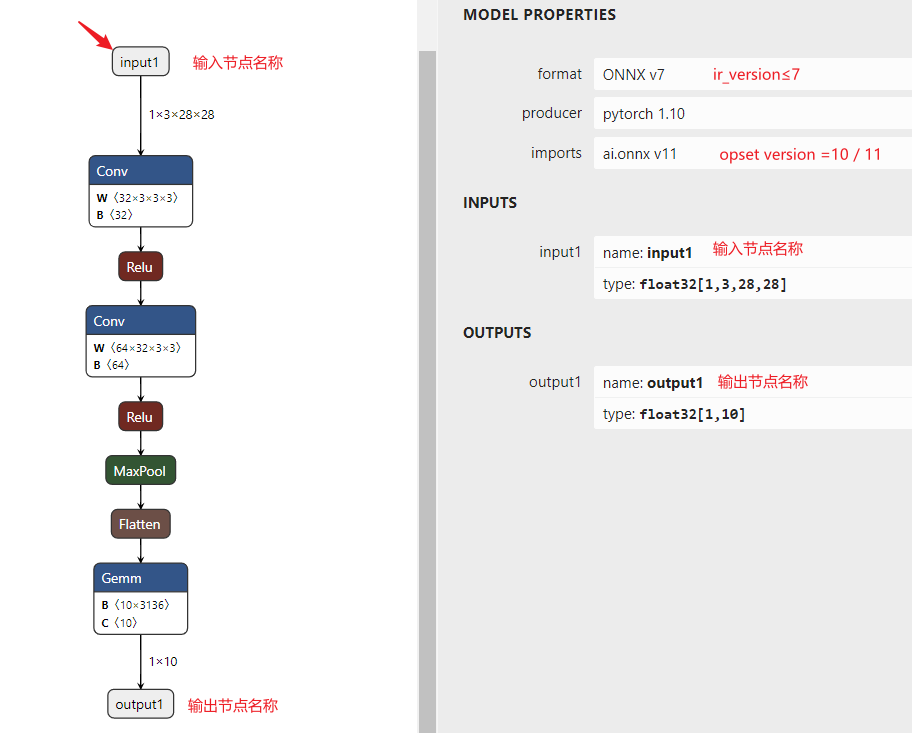 image.png
地平线工具链支持的ONNX模型需要满足 opset_version=10/11 且 ir_version≤7。
7 ir_version和opset_version修改
地平线工具链支持的ONNX模型需要满足 opset_version=10/11 且 ir_version≤7,当拿到的ONNX模型不满足这两个要求时怎么办呢?
如果有条件修改代码重新导出的话,这是一种解决方案。另外一种可尝试的解决方案是直接修改ONNX模型的对应属性,代码示例如下:
如果有条件修改代码重新导出的话,这是一种解决方案。另外一种可尝试的解决方案是直接修改ONNX模型的对应属性,代码示例如下:
model = onnx.load("./MyNet.onnx")
model.ir_version = 6
model.opset_import[0].version = 10
onnx.save_model(model, "MyNetOutput.onnx")
model.ir_version = 6
model.opset_import[0].version = 10
onnx.save_model(model, "MyNetOutput.onnx")
注意:高版本向低版本切换时可能会出现问题,这里只是一种可尝试的解决方案。
使用Netron可视化MyNetoutput.onnx,如下图所示:
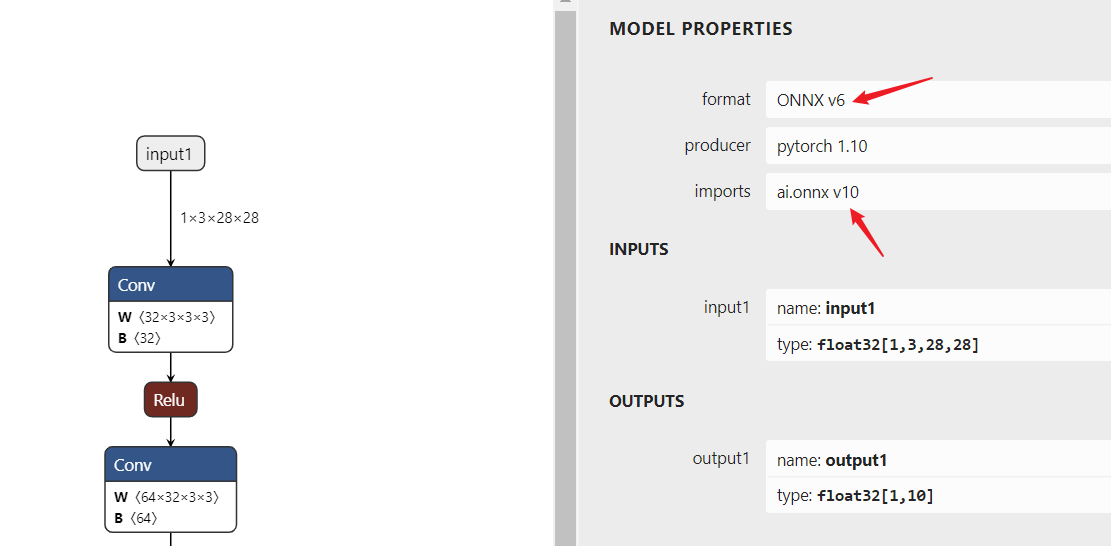 image.png
'/%3e%3cpath%20d='M8%200.5C12.1421%200.5%2015.5%203.85786%2015.5%208C15.5%2012.1421%2012.1421%2015.5%208%2015.5C3.85786%2015.5%200.5%2012.1421%200.5%208C0.5%203.85786%203.85786%200.5%208%200.5Z'%20fill='url(%23paint1_linear_0_45845)'%20stroke='white'/%3e%3cpath%20d='M10.0597%204.5332C10.031%204.5332%2010.0036%204.54817%209.98859%204.57313L8.09724%207.79442C8.02613%207.90046%207.84897%208.23731%207.5483%208.7875C7.37863%209.0969%207.25387%209.32771%207.17152%209.48615C7.1341%209.55727%207.0293%209.53855%207.01807%209.45871C6.97191%209.11936%206.89456%208.6066%206.78727%207.91793L6.2483%204.61804C6.24207%204.57812%206.20713%204.54942%206.16721%204.54942H4.28085C4.2297%204.54942%204.18977%204.59683%204.201%204.64798L5.71059%2012.1959C5.71808%2012.2346%205.75176%2012.2621%205.79044%2012.2621H7.46845C7.49715%2012.2621%207.52335%2012.2471%207.53832%2012.2234L12.1869%204.65796C12.2205%204.60307%2012.1806%204.5332%2012.117%204.5332H10.0597Z'%20fill='white'/%3e%3cdefs%3e%3clinearGradient%20id='paint0_linear_0_45845'%20x1='8.99711'%20y1='15.3526'%20x2='47.3575'%20y2='15.3526'%20gradientUnits='userSpaceOnUse'%3e%3cstop%20stop-color='%23AF86FF'/%3e%3cstop%20offset='1'%20stop-color='%23774EFF'/%3e%3c/linearGradient%3e%3clinearGradient%20id='paint1_linear_0_45845'%20x1='1.1152'%20y1='15.1368'%20x2='15.3888'%20y2='15.1368'%20gradientUnits='userSpaceOnUse'%3e%3cstop%20stop-color='%23AF86FF'/%3e%3cstop%20offset='1'%20stop-color='%23774EFF'/%3e%3c/linearGradient%3e%3c/defs%3e%3c/svg%3e)