1.导出onnx模型。
进入omnidet下的models文件夹下面找到onnx文件夹,会找到export_onnx.py文件。根据文件顶端说明,需要去配置相关的文件。进入data/params.yaml中,在配置文件的最下main可以找到# -- ONNX MODEL EXPORT --相关配置 。choices中可以选择你需要的任务,加入你只需要分割,就将onnx_modelg更改为segmentic,假如你的任务是detection,就将onnx_model更改为detection。这里我们以分割为示例模型。将按照示例得到的训练模型路径写入到model_path,作为导出onnx的输入。然后在onnx_export_path写onnx的导出路径。保存,终端运行python ./onnx_export.py --config data/params.yaml。获取到onnx模型。
2.校准集准备:
import os
import sys
import argparse
import yaml
sys.path.append('./WoodScape-ICCV19/omnidet')
import cv2
import matplotlib as mpl
import matplotlib.cm as cm
import numpy as np
import onnxruntime
import torch
from PIL import Image
from matplotlib import pyplot as plt
from horizon_tc_ui.hb_runtime import HBRuntime
ALPHA = 0.5
def collect_args() -> argparse.Namespace:
"""Set command line arguments"""
parser = argparse.ArgumentParser()
parser.add_argument('--config', help="Config file", type=str, default="params.yaml")
args = parser.parse_args()
return args
class Tupperware(dict):
MARKER = object()
def __init__(self, value=None):
if value is None:
pass
elif isinstance(value, dict):
for key in value:
self.__setitem__(key, value[key])
else:
raise TypeError('expected dict')
def __setitem__(self, key, value):
if isinstance(value, dict) and not isinstance(value, Tupperware):
value = Tupperware(value)
super(Tupperware, self).__setitem__(key, value)
def __getitem__(self, key):
found = self.get(key, Tupperware.MARKER)
if found is Tupperware.MARKER:
found = Tupperware()
super(Tupperware, self).__setitem__(key, found)
return found
__setattr__, __getattr__ = __setitem__, __getitem__
def collect_tupperware() -> Tupperware:
config = collect_args()
params = yaml.safe_load(open(config.config))
args = Tupperware(params)
print(args)
return args
def pre_image_op(args, index, frame_index, cam_side):
total_car1_images = 6054
cropped_coords = dict(Car1=dict(FV=(114, 110, 1176, 610),
MVL=(343, 5, 1088, 411),
MVR=(185, 5, 915, 425),
RV=(186, 203, 1105, 630)),
Car2=dict(FV=(160, 272, 1030, 677),
MVL=(327, 7, 1096, 410),
MVR=(175, 4, 935, 404),
RV=(285, 187, 1000, 572)))
if args.crop:
if int(frame_index[1:]) total_car1_images:
cropped_coords = cropped_coords["Car1"][cam_side]
else:
cropped_coords = cropped_coords["Car2"][cam_side]
else:
cropped_coords = None
cropped_image = get_image(args, index, cropped_coords, frame_index, cam_side)
resized_image = cv2.resize(np.array(cropped_image), (args.input_width, args.input_height),
cv2.INTER_LANCZOS4).transpose((2, 0, 1))
resized_image = np.expand_dims(resized_image, axis=0).astype(np.float32)
return resized_image / 255
def get_image(args, index, cropped_coords, frame_index, cam_side):
recording_folder = "rgb_images" if index == 0 else "previous_images"
file = f"{frame_index}_{cam_side}.png" if index == 0 else f"{frame_index}_{cam_side}_prev.png"
path = os.path.join(args.dataset_dir, recording_folder, file)
image = Image.open(path).convert('RGB')
if args.crop:
return image.crop(cropped_coords)
return image
i = 0
def verify_onnx_model(args):
image_paths = [line.rstrip('\n') for line in open("./ori_dataset/val.txt")]
print(image_paths)
i = 0
for path in image_paths:
frame_index, cam_side = path.split('.')[0].split('_')
previous_frame = pre_image_op(args, -1, frame_index, cam_side)
current_frame = pre_image_op(args, 0, frame_index, cam_side)
np.save(f"calibration_data_rgb/previous_data_npy/previous_index{i}.npy",previous_frame)
np.save(f"calibration_data_rgb/rgb_data_npy/current_index{i}.npy",current_frame)
i += 1
if __name__ == "__main__":
# load your predefined ONNX model
args = collect_tupperware()
verify_onnx_model(args)
数据预处理流程要和训练集合数据处理流程一样。
3.配置文件设置
calibration_parameters:
cal_data_dir: ./calibration_data_rgb/previous_data_npy;./calibration_data_rgb/rgb_data_npy
cal_data_type: ''
calibration_type: default
optimization: ''
per_channel: false
quant_config: ''
run_on_bpu: ''
run_on_cpu: ''
compiler_parameters:
advice: 0
balance_factor: 0
compile_mode: latency
core_num: 1
debug: true
jobs: 16
max_time_per_fc: 0
optimize_level: O2
input_parameters:
input_layout_rt: ''
input_layout_train: NCHW;NCHW
input_name: input.1;input.55
input_shape: 1x3x288x544;1x3x288x544
input_type_rt: featuremap;featuremap
input_type_train: featuremap;featuremap
# mean_value: 0;0
#norm_type: data_mean_and_scale;data_mean_and_scale
#scale_value: 0.003921568627451;0.003921568627451
separate_batch: false
model_parameters:
debug_mode: ''
layer_out_dump: false
march: nash-e
node_info: ''
onnx_model: omnidet_float32_opset12.onnx
output_model_file_prefix: omnidet_float32_opset12
output_nodes: ''
remove_node_name: ''
remove_node_type: ''
working_dir: ./model_output
因为是双输入,所以 cal_data_dir: ./calibration_data_rgb/previous_data_npy;./calibration_data_rgb/rgb_data_npy 这里配置两个校准集路径,后面的一些配置都配置成双份的。
4.模型量化编译。
hb_compile --config config.file
编译时间较长,耐心等待即可。
在model_output中我们会得到hbm模型文件,该模型文件是经过量化之后的。
5.板端编译部署
可以选择在服务器端进行编译,也可以在板端进行编译。NVCC交叉编译。前提是需要安装好gcc,g++,可以用which gcc,which g++查看是否安装了C++编译器。我们以Cmake形式进行工程编译。
CMakeList.txt如下:
# CMakeLists.txt
cmake_minimum_required(VERSION 3.0)
project(test_sample)
set(CMAKE_CXX_FLAGS "${CMAKE_CXX_FLAGS} -std=c++11 -Wl,-unresolved-symbols=ignore-in-shared-libs")
message(STATUS "Build type: ${CMAKE_BUILD_TYPE}")
set(CMAKE_CXX_FLAGS_DEBUG "-g -O0")
set(CMAKE_C_FLAGS_DEBUG "-g -O0")
set(CMAKE_CXX_FLAGS_RELEASE " -O3 ")
set(CMAKE_C_FLAGS_RELEASE " -O3 ")
set(CMAKE_BUILD_TYPE ${build_type})
set(DEPS_ROOT ${CMAKE_CURRENT_SOURCE_DIR}/deps_aarch64)
include_directories(${DEPS_ROOT}/ucp/include)
include_directories(/map/haiquan.liu/test2/test_sample/deps_aarch64/opencv/include)
link_directories(${DEPS_ROOT}/ucp/lib)
# 设置 OpenCV 头文件和库路径
add_executable(run_sample src/main.cc)
target_link_libraries(run_sample dnn hbucp)
target_link_libraries(run_sample "/map/haiquan.liu/test2/test_sample/deps_aarch64/opencv/lib/libopencv_world.so")
main函数如下:
#include
#include
#include
#include
#include
#include "hobot/dnn/hb_dnn.h"
#include "hobot/hb_ucp.h"
#include "hobot/hb_ucp_sys.h"
using namespace cv;
#define ALIGN(value, alignment) (((value) + ((alignment)-1)) & ~((alignment)-1))
#define ALIGN_32(value) ALIGN(value, 32)
const char* hbm_path = "omnidet_float32_opset12.hbm";
std::string data_path1 = "input_file1.bin";
std::string data_path2 = "input_file2.bin";
// Read binary input file
int read_binary_file(std::string file_path, char **bin, int *length) {
std::ifstream ifs(file_path, std::ios::in | std::ios::binary);
ifs.seekg(0, std::ios::end);
*length = ifs.tellg();
ifs.seekg(0, std::ios::beg);
*bin = new char[sizeof(char) * (*length)];
ifs.read(*bin, *length);
ifs.close();
return 0;
}
// Prepare input tensor and output tensor
int prepare_tensor(hbDNNTensor *input_tensor, hbDNNTensor *output_tensor,
hbDNNHandle_t dnn_handle) {
// Get input and output tensor counts
int input_count = 0;
int output_count = 0;
hbDNNGetInputCount(&input_count, dnn_handle);
hbDNNGetOutputCount(&output_count, dnn_handle);
hbDNNTensor *input = input_tensor;
// Get the properties of the input tensor
for (int i = 0; i input_count; i++) {
hbDNNGetInputTensorProperties(&input[i].properties, dnn_handle, i);
// Calculate the stride of the input tensor
auto dim_len = input[i].properties.validShape.numDimensions;
for (int32_t dim_i = dim_len - 1; dim_i >= 0; --dim_i) {
if (input[i].properties.stride[dim_i] == -1) {
auto cur_stride =
input[i].properties.stride[dim_i + 1] *
input[i].properties.validShape.dimensionSize[dim_i + 1];
input[i].properties.stride[dim_i] = ALIGN_32(cur_stride);
}
}
// Calculate the memory size of the input tensor and allocate cache memory
int input_memSize = input[i].properties.stride[0] *
input[i].properties.validShape.dimensionSize[0];
hbUCPMallocCached(&input[i].sysMem, input_memSize, 0);
}
hbDNNTensor *output = output_tensor;
// Get the properties of the input tensor
for (int i = 0; i output_count; i++) {
hbDNNGetOutputTensorProperties(&output[i].properties, dnn_handle, i);
// Calculate the memory size of the output tensor and allocate cache memory
int output_memSize = output[i].properties.alignedByteSize;
hbUCPMallocCached(&output[i].sysMem, output_memSize, 0);
// Show how to get output name
const char *output_name;
hbDNNGetOutputName(&output_name, dnn_handle, i);
}
return 0;
}
int main() {
// 获取模型句柄
hbDNNPackedHandle_t packed_dnn_handle;
hbDNNHandle_t dnn_handle;
hbDNNInitializeFromFiles(&packed_dnn_handle, &hbm_path, 1);
const char **model_name_list;
int model_count = 0;
hbDNNGetModelNameList(&model_name_list, &model_count, packed_dnn_handle);
hbDNNGetModelHandle(&dnn_handle, packed_dnn_handle, model_name_list[0]);
// Prepare input and output tensor
std::vectorhbDNNTensor> input_tensors;
std::vectorhbDNNTensor> output_tensors;
int input_count = 0;
int output_count = 0;
hbDNNGetInputCount(&input_count, dnn_handle);
hbDNNGetOutputCount(&output_count, dnn_handle);
input_tensors.resize(input_count);
output_tensors.resize(output_count);
// Initialize and malloc the tensor
prepare_tensor(input_tensors.data(), output_tensors.data(), dnn_handle);
// 复制输入数据到输入张量
int32_t data_length1 = 0;
int32_t data_length2 = 0;
char *data1 = nullptr, *data2 = nullptr;
// 读取两个输入数据
auto ret1 = read_binary_file(data_path1, &data1, &data_length1);
auto ret2 = read_binary_file(data_path2, &data2, &data_length2);
// 将数据复制到输入张量
memcpy(reinterpret_castchar *>(input_tensors[0].sysMem.virAddr), data1, input_tensors[0].sysMem.memSize);
memcpy(reinterpret_castchar *>(input_tensors[1].sysMem.virAddr), data2, input_tensors[1].sysMem.memSize);
// 刷新内存,确保数据写入
hbUCPMemFlush(&(input_tensors[0].sysMem), HB_SYS_MEM_CACHE_CLEAN);
hbUCPMemFlush(&(input_tensors[1].sysMem), HB_SYS_MEM_CACHE_CLEAN);
// 提交推理任务并等待完成
hbUCPTaskHandle_t task_handle{nullptr};
hbDNNTensor *output = output_tensors.data();
hbDNNInferV2(&task_handle, output, input_tensors.data(), dnn_handle);
// 等待任务完成
hbUCPSchedParam ctrl_param;
HB_UCP_INITIALIZE_SCHED_PARAM(&ctrl_param);
ctrl_param.backend = HB_UCP_BPU_CORE_ANY;
hbUCPSubmitTask(task_handle, &ctrl_param);
hbUCPWaitTaskDone(task_handle, 0);
// 解析推理结果并处理每个输出张量
for (int i = 0; i 4; ++i) {
hbUCPMemFlush(&output_tensors[i].sysMem, HB_SYS_MEM_CACHE_INVALIDATE);
auto result = reinterpret_castfloat *>(output_tensors[i].sysMem.virAddr);
// 处理每个任务的结果
if (i == 0) {
// 任务1: 处理 output_tensors[0]
// 例如分类任务,分割任务等
} else if (i == 1) {
// 任务2: 处理 output_tensors[1]
// int height = output_tensors[i].properties.shape[1]; // 输出图像的高度
// int width = output_tensors[i].properties.shape[2]; // 输出图像的宽度
int height = 288; // 输出图像的高度
int width = 544; // 输出图像的宽度
// 假设result是一个(float类型的)指向概率的指针,维度为(10, 288, 544)
// 10个类别,对应每个像素的类别概率
float* result = reinterpret_castfloat*>(output_tensors[i].sysMem.virAddr);
// 创建一个伪彩色图像用于渲染(将类别索引映射到颜色)
cv::Mat rendered_image(height, width, CV_8UC3);
// 创建一个颜色映射(例如,10个类别对应不同颜色)
std::vectorcv::Vec3b> color_map = {
cv::Vec3b(0, 0, 255), // 类别 0 (红色)
cv::Vec3b(0, 255, 0), // 类别 1 (绿色)
cv::Vec3b(255, 0, 0), // 类别 2 (蓝色)
cv::Vec3b(0, 255, 255), // 类别 3 (青色)
cv::Vec3b(255, 255, 0), // 类别 4 (黄色)
cv::Vec3b(255, 0, 255), // 类别 5 (品红)
cv::Vec3b(128, 128, 128), // 类别 6 (灰色)
cv::Vec3b(255, 165, 0), // 类别 7 (橙色)
cv::Vec3b(255, 20, 147), // 类别 8 (深粉色)
cv::Vec3b(0, 191, 255) // 类别 9 (深天蓝)
};
// 对每个像素进行argmax操作,选择概率最大类别
for (int h = 0; h height; ++h) {
for (int w = 0; w width; ++w) {
// 每个像素有10个类别的概率,找到最大概率对应的类别索引
int class_id = 0;
float max_prob = result[class_id * height * width + h * width + w];
for (int c = 1; c 10; ++c) {
float prob = result[c * height * width + h * width + w];
if (prob > max_prob) {
max_prob = prob;
class_id = c;
}
}
// 将类别索引映射到颜色
rendered_image.atcv::Vec3b>(h, w) = color_map[class_id];
}
}
// 保存渲染图像
cv::imwrite("segmentation_output.png", rendered_image);
} else if (i == 2) {
// 任务3: 处理 output_tensors[2]
} else if (i == 3) {
// 任务4: 处理 output_tensors[3]
}
}
return 0;
}
注意将环境以来迁移过来 ,如在服务器的docker环境下,则不必迁移过来。直接在服务器端编译即可。
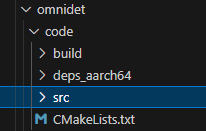
布局如下
然后mkdir build,cd build,cmake ..,make 依次操作。
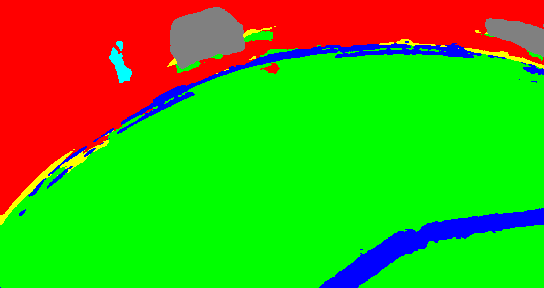
会在build文件夹下得到编译过的二进制文件,将输入数据以及模型和二进制文件迁移到同个文件夹下面。运行./二进制文件即可。分割效果图如下


'/%3e%3cpath%20d='M8%200.5C12.1421%200.5%2015.5%203.85786%2015.5%208C15.5%2012.1421%2012.1421%2015.5%208%2015.5C3.85786%2015.5%200.5%2012.1421%200.5%208C0.5%203.85786%203.85786%200.5%208%200.5Z'%20fill='url(%23paint1_linear_0_45845)'%20stroke='white'/%3e%3cpath%20d='M10.0597%204.5332C10.031%204.5332%2010.0036%204.54817%209.98859%204.57313L8.09724%207.79442C8.02613%207.90046%207.84897%208.23731%207.5483%208.7875C7.37863%209.0969%207.25387%209.32771%207.17152%209.48615C7.1341%209.55727%207.0293%209.53855%207.01807%209.45871C6.97191%209.11936%206.89456%208.6066%206.78727%207.91793L6.2483%204.61804C6.24207%204.57812%206.20713%204.54942%206.16721%204.54942H4.28085C4.2297%204.54942%204.18977%204.59683%204.201%204.64798L5.71059%2012.1959C5.71808%2012.2346%205.75176%2012.2621%205.79044%2012.2621H7.46845C7.49715%2012.2621%207.52335%2012.2471%207.53832%2012.2234L12.1869%204.65796C12.2205%204.60307%2012.1806%204.5332%2012.117%204.5332H10.0597Z'%20fill='white'/%3e%3cdefs%3e%3clinearGradient%20id='paint0_linear_0_45845'%20x1='8.99711'%20y1='15.3526'%20x2='47.3575'%20y2='15.3526'%20gradientUnits='userSpaceOnUse'%3e%3cstop%20stop-color='%23AF86FF'/%3e%3cstop%20offset='1'%20stop-color='%23774EFF'/%3e%3c/linearGradient%3e%3clinearGradient%20id='paint1_linear_0_45845'%20x1='1.1152'%20y1='15.1368'%20x2='15.3888'%20y2='15.1368'%20gradientUnits='userSpaceOnUse'%3e%3cstop%20stop-color='%23AF86FF'/%3e%3cstop%20offset='1'%20stop-color='%23774EFF'/%3e%3c/linearGradient%3e%3c/defs%3e%3c/svg%3e)