
硬件环境:MARTIX_SIP_J6X_V2P0
问题描述:使用flash.py烧写MCU镜像之后,板子启动不可,电流在0.11A左右,在执行官方手册中提供的空片/救砖的方法后,fastboot烧写失败。
恢复的步骤:
1.将SW2-2拨到ON的状态,确认此时MCU的串口在打印UUU.
2.按照J6系统软件手册/J6X MCU指导手册1.2.4章节的步骤
.\dfu-util-static.exe -d 3652:6610 -a 0 -D .\cmd_load_sbl
.\dfu-util-static.exe -d 3652:6610 -a 0 -D .\sbl.pkg
.\dfu-util-static.exe -d 3652:6610 -a 0 -D .\cmd_exit
.\dfu-util-static.exe -d 3652:6620 -a 0 -D .\u-boot-spl_ddr.bin -R
.\dfu-util-static.exe -d 3652:6620 -a 0 -D .\J6_MCU_DEBUG.bin -R
.\dfu-util-static.exe -d 3652:6625 -a 0 -D .\hobot-j6x-bl31.dtb
.\dfu-util-static.exe -d 3652:6625 -a 1 -D .\bl31.bin
.\dfu-util-static.exe -d 3652:6625 -a 2 -D .\tee-pager_v2.bin
.\dfu-util-static.exe -d 3652:6625 -a 3 -D .\u-boot.bin -R
这一步执行完毕后,Acore的串口可以看到uboot启动了
3.紧接着在Acore的串口中输入命令
dcache off
fastboot 0
4.调用flash_all.sh去进行恢复,第一步执行时就出现了错误,执行的命令.\fastboot.exe flash fpt fpt.img
此时报错fpt partition size:0,fpt image size:262144
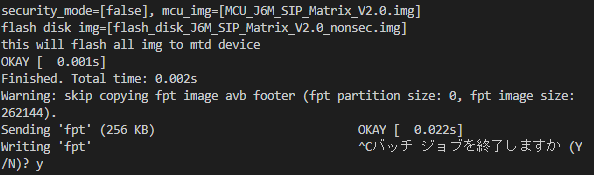
有人知道这个应该怎么进行恢复吗?

'/%3e%3cpath%20d='M8%200.5C12.1421%200.5%2015.5%203.85786%2015.5%208C15.5%2012.1421%2012.1421%2015.5%208%2015.5C3.85786%2015.5%200.5%2012.1421%200.5%208C0.5%203.85786%203.85786%200.5%208%200.5Z'%20fill='url(%23paint1_linear_0_45845)'%20stroke='white'/%3e%3cpath%20d='M10.0597%204.5332C10.031%204.5332%2010.0036%204.54817%209.98859%204.57313L8.09724%207.79442C8.02613%207.90046%207.84897%208.23731%207.5483%208.7875C7.37863%209.0969%207.25387%209.32771%207.17152%209.48615C7.1341%209.55727%207.0293%209.53855%207.01807%209.45871C6.97191%209.11936%206.89456%208.6066%206.78727%207.91793L6.2483%204.61804C6.24207%204.57812%206.20713%204.54942%206.16721%204.54942H4.28085C4.2297%204.54942%204.18977%204.59683%204.201%204.64798L5.71059%2012.1959C5.71808%2012.2346%205.75176%2012.2621%205.79044%2012.2621H7.46845C7.49715%2012.2621%207.52335%2012.2471%207.53832%2012.2234L12.1869%204.65796C12.2205%204.60307%2012.1806%204.5332%2012.117%204.5332H10.0597Z'%20fill='white'/%3e%3cdefs%3e%3clinearGradient%20id='paint0_linear_0_45845'%20x1='8.99711'%20y1='15.3526'%20x2='47.3575'%20y2='15.3526'%20gradientUnits='userSpaceOnUse'%3e%3cstop%20stop-color='%23AF86FF'/%3e%3cstop%20offset='1'%20stop-color='%23774EFF'/%3e%3c/linearGradient%3e%3clinearGradient%20id='paint1_linear_0_45845'%20x1='1.1152'%20y1='15.1368'%20x2='15.3888'%20y2='15.1368'%20gradientUnits='userSpaceOnUse'%3e%3cstop%20stop-color='%23AF86FF'/%3e%3cstop%20offset='1'%20stop-color='%23774EFF'/%3e%3c/linearGradient%3e%3c/defs%3e%3c/svg%3e)